
Hollywood Glamour Photos and How To Take Them.
November 7, 2009 by Darkman
Filed under All Articles, Books and Reviews, Featured, Hollywood Glamour Lighting, Lighting Diagrams, Videos and Tips
Daisy Devine
Be sure to check out the behind the scenes shots from this shoot, the link to that article is posted at the bottom of this article.
I’m asked all the time “How do you do that?”, the style of Hollywood Glamour Photography I do. I had a great teacher, George Hurrell. Someone introduced me to the work of George Hurrell a while back, and so I Googled George and I fell in love with his work. Since then I have collected every book I can get my hands on about him and his work. I’ve got A LOT of books about and by George Hurrell, and I have read every one of them. I’ve studied each picture, read each detail I could find about each picture, and George left excellent notes. One of the books went as far as to have the settings of the camera for each photo cataloged in the back index. What a great resource that is!
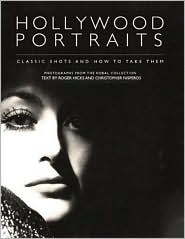
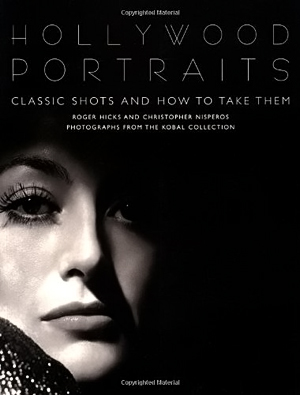
Rather than re-invent the wheel, I’m going to just name the one book I would suggest to anyone get who seriously wants to start learning how to do Hollywood Glamour Photography. The name of the book is “Hollywood Portraits : Classic Shots and How to Take Them.
The most of the images in the book are from the Kobal Collection. John Kobal was the pre-eminent film historian and collector of Hollywood film photography. If one gets a chance to see part of his collection in a show or a museum gallery, it is awe inspiring. I’ve seen one in Santa Barbara and I was very moved, most likely because I am so into this style of photography.
The book describes each image, and then points out the telltale signs of how many lights there were used. Placement of the lights. Why they think there were this many lights and so on. They also have drawings to re-create the set and show how the lights and subject should be in placement. The book is where I got my start and is where I refer to again and again to remember how to look at the images I see and wonder “how did they do that”. One thing, a great clue that I can give anyone is look at the shadows. The shadows tell all. Where the light came from and how many lights. Also look at the highlights in each image, they also reveal where or how many lights were used, but the shadows are better.
So if you really would like to get a head start in learning how to take Hollywood Glamour Photos Get this book, it will help you save hours of questions and searching. I mean it’s a huge start.
Enjoy…
Darkman…
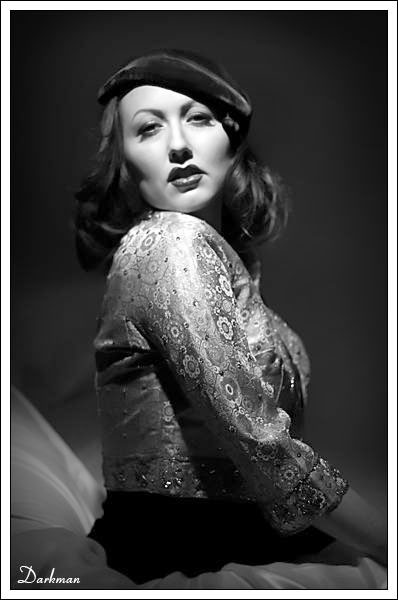
PS Below are a couple images from George Hurrell and a couple I did, that were similar.
Make-up by Marissa Freeman
The Behind the scenes shots from this shoot are HERE
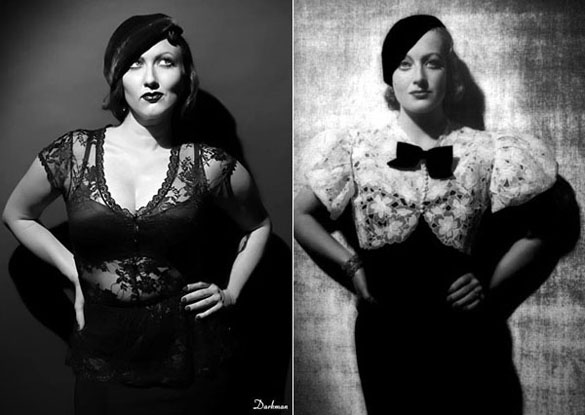
Daisy Devine / Joan Crawford
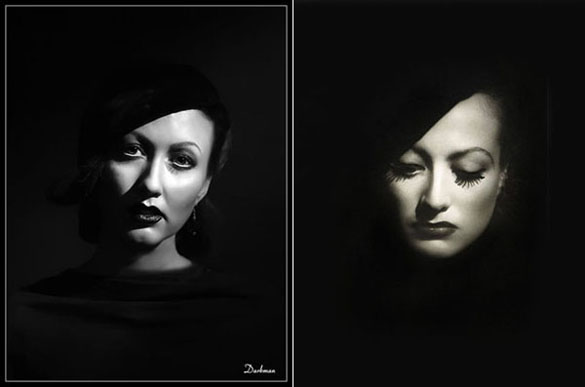
Daisy Devine / Joan Crawford
And as always if you enjoyed this please share it…
How was this post? Good? Bad? Or?
Please leave a comment below!
Check out the list of recommended
Hollywood Glamour Photography
Books and Videos Here


I think yours looks better 🙂
You’re killing it Larry! Nice work!
Hey thanks Jon!!! How you Doing?!!Still shooting in that studio you had?
Dude you know your good when you images surpass those of your teacher. But one never notices its always others that let you know. You images are completely diff to those of Mr. Hurells but crazy similar. I like your yours better.
You are goldmine for old eyes. Love what you do.
thank You for the comment.
🙂
I read once that some era photographers would pull a silk stocking over the light (or was it the lens?) to get the Hollywood effect. Has anyone tried that with success?
Actually that is used to get a softened look in the photograph, by putting a stocking over the camera lense. back in the day the lenses had spherical aberrations, sometimes accidental sometimes purposely, to create soft focus. Nowadays, the lenses made are usually very good quality and in order to get a soft focus one must do the stocking trick or you can smear vasoline on a lense cover, around the EDGES to create soft focus, or you can do it in photoshop.
Using a stocking or a soft focus lense in my opinion is the better way thank in photoshop. photoshop looks like photoshop.
Thanks for sending me this I’m a whore for Hurrell!
Love the shots and you answered a question in my mind as in what book to start with…
thanks
Love they way you capture that era! I never get tired of seeing these kinds of photo’s. Thanks
Any recommendations for a poor mans lighting setup for this kind of work? Is it possible? Just wondering. Student on a major budget. Can rent a studio but would like to create something on a budget at home. Ideas? links?
Thanks!
You can find the lights on ebay sometimes for dirt cheap. just look around and research before buying or bidding on something. most images there on the sirte were created in my small apartments livingroom at the time. Now I have a studio I use but close quarters can still be done.
Larry
Thanks Larry. Appreciate it.
Hey Jill, I would check ebay. I’ve gotten alot of good stuff on ebay before and it’s where I check first every time.
LArry
Somehow your versions are more glamorous. The first Daisy-Joan photo benefitted from your choice of a simpler background. I remember the old stocking technique – black stockings for men and natural for the women. Love your work. Keep clicking!
Hi Larry
Loving your Hollywood style images, Something were recreating whenever we get the chance in The Old Bakery Studio in Poole, Glamorous and creative, fantastic and thanks for the tips